
Windows · Block porn & explicit content
Block porn and gambling
Switch on our built-in lists.
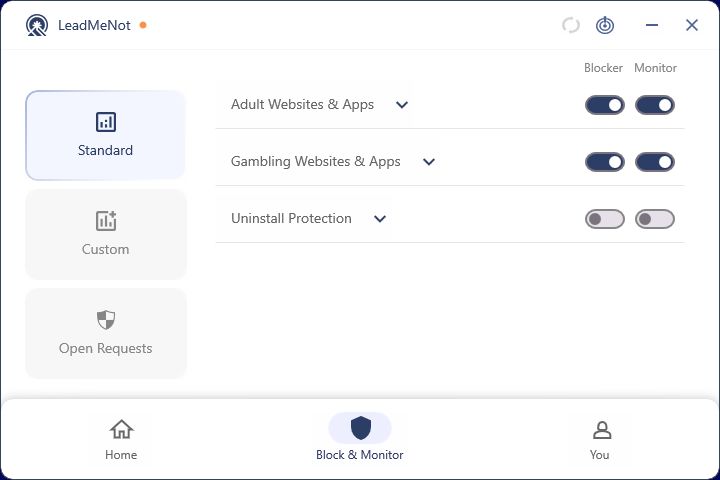
Step 1 of 3
Open Block & Monitor › Standard
Click Block & Monitor at the bottom, then Standard on the left.
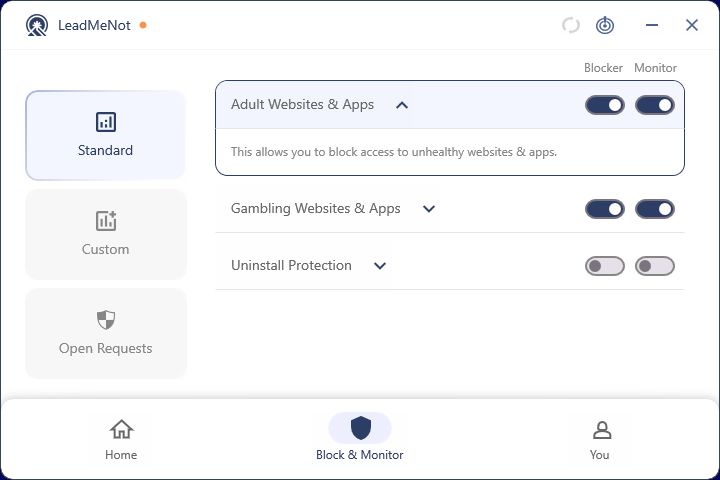
Step 2 of 3
Switch on Block for each list
Turn on Block next to Adult Websites & Apps and Gambling Websites & Apps. Click a rule's arrow to read what it covers.
Switch on Monitor too and your partner is alerted when a rule is hit.
Browser
Step 3 of 3
Test it: type leadmenottest
Open your browser, type leadmenottest into the address bar and go. If LeadMeNot blocks the page, everything is working.
Not blocked? Check you installed with Run as administrator, you're signed in and you restarted afterwards. Still not blocked? See Blocking isn't working on Windows.
The test only works while blocking is on, for example with Adult Websites & Apps switched on.
Did this work?
Great. Here's what people usually do next:
Sorry about that. Email Jason and we'll include which guide and step you were on, or ask our assistant.