
Windows · Account & billing
See or remove your devices
Check which devices use your plan, and free up a slot.
Pick up where you left off?
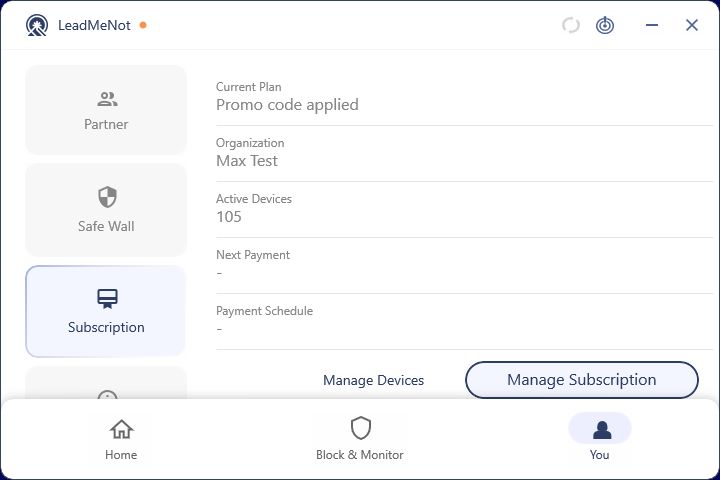
Step 1 of 2
Open You › Subscription
Click You, then Subscription. It shows your plan and active devices. Click Manage Devices.
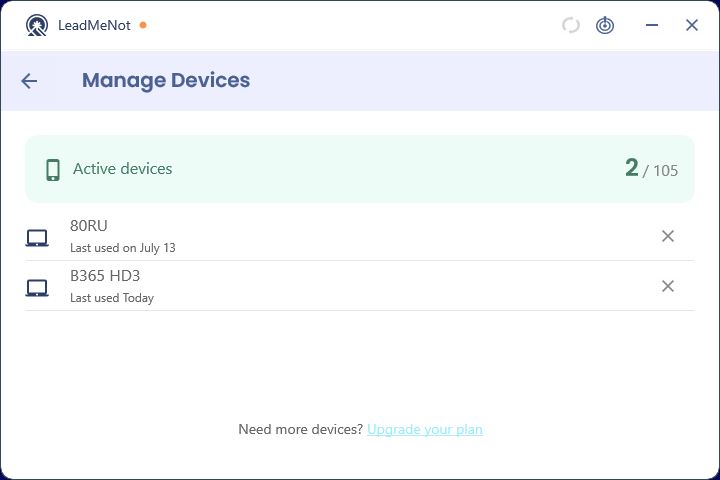
Step 2 of 2
Remove a device you no longer use
Click the × next to it. Removing a device goes through your Safe Wall.
Good to know
Stuck on Device Limit Reached and can't get in? Email jason@leadmenot.org with your account email.
Pick an option above
Did this work?
Great. Here's what people usually do next:
Sorry about that. Email Jason and we'll include which guide and step you were on, or ask our assistant.