
iPhone & iPad · Block porn & explicit content
Safari Extension or VPN: which should I use?
Both protect your browsing on iPhone. Here's how to choose.
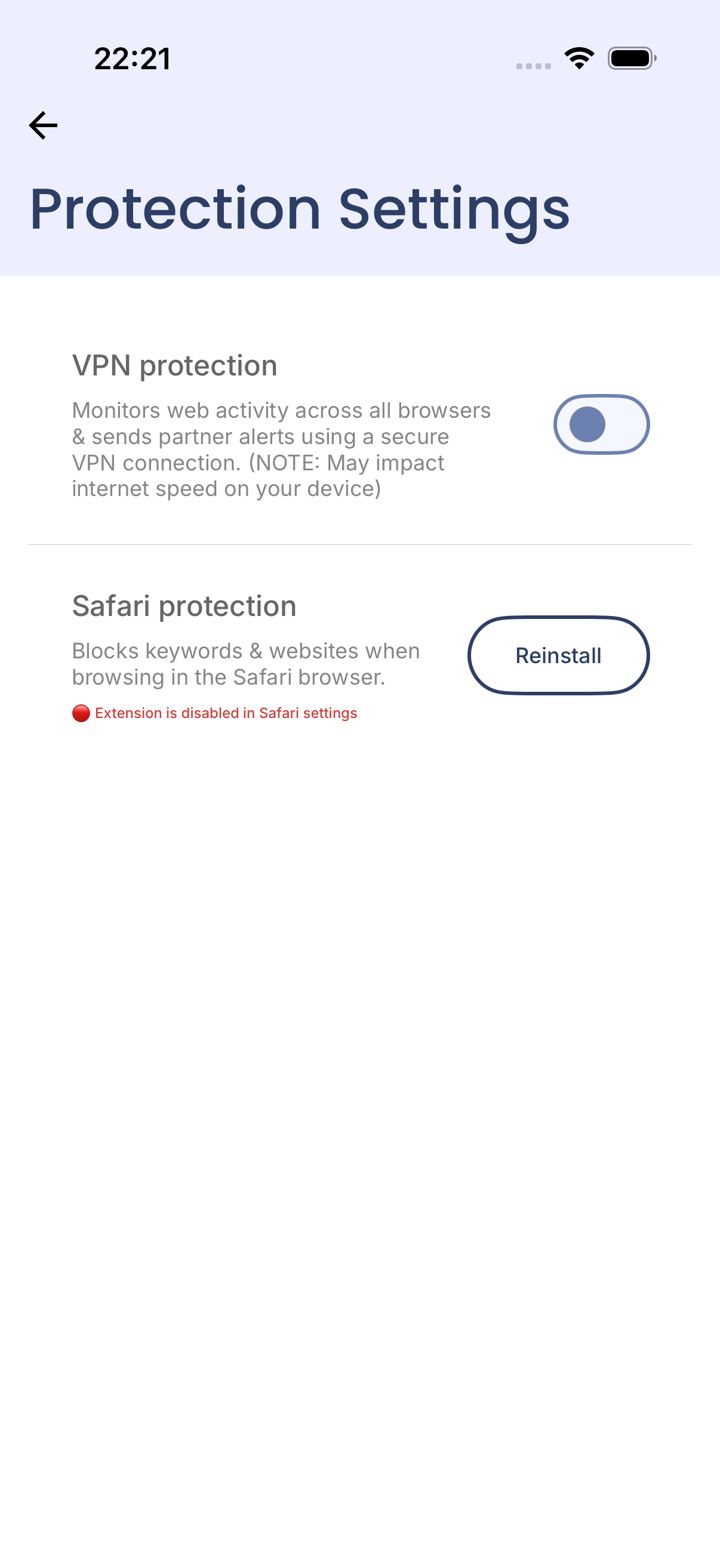
Step 1 of 4
Two ways to protect your browsing
Under You › Protection Settings there are two options. The Safari Extension blocks websites and keywords inside Safari. VPN protection watches web activity in every browser.
Recommended
Step 2 of 4
Why we recommend the Safari Extension
It works reliably inside Safari with none of the side effects of a VPN. Apple only allows extensions in Safari, so pair it with a rule that blocks every other browser. Then all your browsing goes through Safari, where it's protected.
VPN protection
Step 3 of 4
When VPN protection makes sense
Choose VPN protection if you want every browser monitored, for example if you need to keep Chrome.
Like every VPN on iPhone, it comes with limits that no app developer can get around: iPhone can switch it off in the background, it can't run at the same time as another VPN (like a work or school VPN), and it can slow your connection or stop some apps and Wi-Fi networks working properly.
Step 4 of 4
Which do you want?
You can switch later.
Did this work?
Great. Here's what people usually do next:
Sorry about that. Email Jason and we'll include which guide and step you were on, or ask our assistant.