
Windows · Lock it down
Stop LeadMeNot being removed
Uninstall Protection, plus a Safe Wall so it can't be switched off in a weak moment.
Not on Windows? iPhone & iPad · Android · Mac · Chromebook
Pick up where you left off?
Step 1 of 3
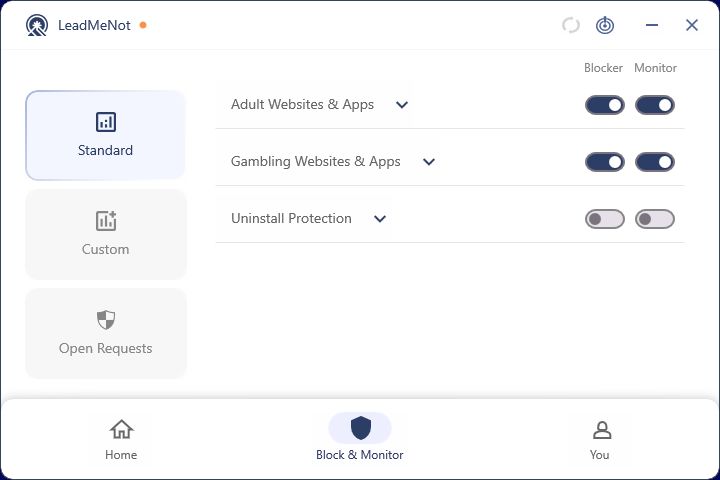
Switch on Uninstall Protection
In LeadMeNot, open Block & Monitor › Standard and switch on Uninstall Protection. Removing LeadMeNot then goes through your Safe Wall.
Step 2 of 3
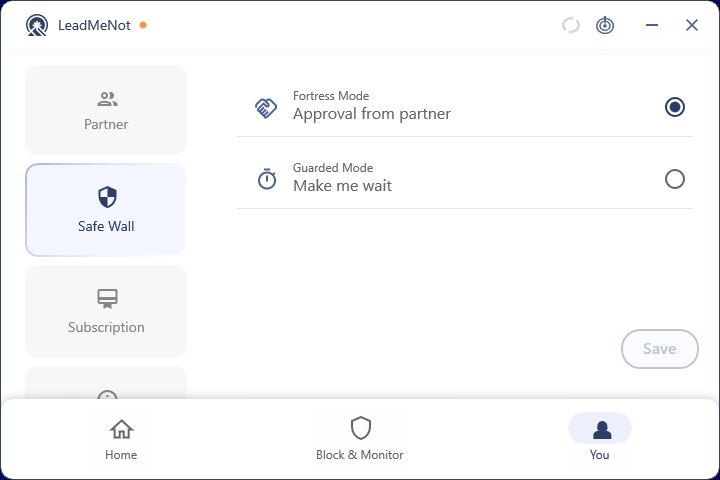
Lock it with your Safe Wall
Set Safe Wall to Approval from partner, so switching Uninstall Protection off needs your partner's OK.
Good to know
Step 3 of 3
What your partner sees
With Monitor on, your partner is alerted if LeadMeNot is logged out, uninstalled or switched off.
Pick an option above
Did this work?
Great. Here's what people usually do next:
Sorry about that. Email Jason and we'll include which guide and step you were on, or ask our assistant.